

Consistently posting on social media helps build trust and community with your audience. A more cynical way to say this is that “social media is a necessary evil”! After all, people expect brands to be active online.
However, even the most enthusiastic marketers sometimes hit a wall when it comes to fresh ideas. I’m right there with you! I’ve been managing various business / nonprofit social media accounts since around 2015, with some of them going on eight years under my direct management. Talk about creative fatigue!
But month in and month out, my team and I continue to create fresh content for every brand we work alongside. Lucky for us, we have more tools than ever to spark creativity and generate compelling content ideas.
Let’s pull back the curtain and look at how I brainstorm new social media post ideas, which includes leveraging helpful AI tools. Whether you’re staring at a blank content calendar or just want to build a robust idea bank, these strategies will keep your social media fresh and help you break through your writer’s block!
Step 1: Always Look for Inspiration
For those moments when you’re feeling tapped out, it helps to have a stockpile of ideas on hand. Screenshot posts you like when you’re scrolling social media, or use the “save” feature on platforms like Facebook, Instagram, TikTok, and LinkedIn to hang on to ideas you want to come back to later.
By the way, these ideas don’t have to be from within your industry! When you train yourself to look for inspiration, you’ll start seeing it everywhere.
I will often screenshot graphics I like, for design inspiration, or clever ad copy that shows up in my feed. If you’re active on TikTok and/or Instagram Reels, you should also be keeping an eye out for trends so you can join in on the fun!
Tired of scrolling? Inspiration is everywhere. TV ads, podcasts, billboards, and even junk mail have all served as fodder for fresh social media post ideas. Just keep your eyes open!
Step 2: Pick Your Content Buckets
Let’s get strategic about this: You don’t just want a post idea for today, right? You want an ongoing system that will allow you to “rinse and repeat” your content ideas!
That’s where content buckets can be a lifesaver. You’re basically starting broad with select content themes (also called “pillars”) and then pinpointing ideas within each category.
So, make a list of the types of content you would like to create. Keep your business/marketing goals in mind… but don’t think too hard!
Below, I’ve outlined nine “content buckets” that I use with my clients’ social media sites; you can choose anywhere from three to nine for your small business:
Promotional
Asking people to take the next step in buying your product or service.
Educational
Providing a resource such as a tip, resource, or video related to your expertise. This could be content you create yourself or content that you curate from a trusted source.
Branding
Talking about your “why” – your mission, values, or purpose of existing.
Behind-the-Scenes
Bringing people behind the curtain of your organization, such as showcasing how something is made or describing what goes into your process.
Company Culture
Showing what it’s like to work with you, such as a group meeting, employee spotlight, or talking about why people want to work for you.
Success Stories
Sharing testimonials or success stories from happy customers or clients.
Engagement
Inviting people to engage with your content with a question, poll, or contest.
Inspirational
Giving encouragement or motivation through a quote, a throwback story from your organization’s history, or another inspirational story.
Humorous
Sharing a funny cartoon, meme, or video. This could be something you create or something you curate from another source.
Quick tip! Download my free guide that breaks down these content buckets into 57 workable ideas for any brand.
Step 3: Use AI as Your Brainstorming Partner
Generative AI is your secret weapon for helping you come up with new social media post ideas. But you have to be strategic with your prompting, otherwise the results won’t be super helpful.
Start by giving your AI tool (ChatGPT, Claude, etc.) all the background on your company. You can upload documents (brand strategy, brand voice, etc.) or simply copy-paste your website into the chat. Here’s a basic prompt you can modify:
My brand, [BUSINESS NAME], helps [BRIEFLY DESCRIBE TARGET AUDIENCE] by providing [BRIEFLY DESCRIBE CORE SERVICE/PRODUCT]. Our goal as a company is to [DESCRIBE YOUR MISSION / THE MAIN PROBLEM YOU SOLVE]. On social media, our main goal is to [INSERT GOAL – drive engagement, add followers, educate our target audience…etc.]
Then, provide information about your chosen content buckets.
Today, we are going to brainstorm social media post ideas together. Here are our content buckets that we want to stay within: [INSERT CONTENT BUCKETS – include a sentence or two to describe each one]. And here are some examples of social media posts that have performed well: [INSERT POSTS]
Now you’re ready to provide your specific request, such as:
Generate 10 educational post ideas that address common problems or FAQs my target audience faces.
Give me 10 creative behind-the-scenes content ideas that would help us build trust.
This is an ongoing conversation you can have within your chat. The more feedback and examples you can provide, the better the post ideas will become.
Personally, I use Claude and ChatGPT (via Magai) for content brainstorming because it can understand context and generate ideas that feel authentic to my brand voice.
Remember, AI doesn’t know your specific client stories, your personal experiences, or your unique industry insights. Use AI to spark ideas, then infuse them with your authentic voice and real-world experience.
The magic happens when you blend AI efficiency with authentic human creativity!
Step 4: Organize Your Social Media Post Ideas
Your next step is to put all of your content ideas in one place. Don’t just let them live in your AI chat conversation; you need to put them somewhere that is actually useful!
I use Google Sheets and Google Docs in my Google Workspace to organize ideas. For every brand I partner with, I create a separate “notes” document or tab to keep track of post ideas. If I know that a specific post idea would be perfect for a certain date, month, or season, I’ll create an Asana task with a deadline.
Step 5: Create Your Content
This is when you finally get to start making all the posts you brainstormed in the previous step!
Each of my clients gets their own content calendar, built in Google Sheets. Here’s a sample that you can use as a starting point (click the image to download a free copy for G-Suite users):
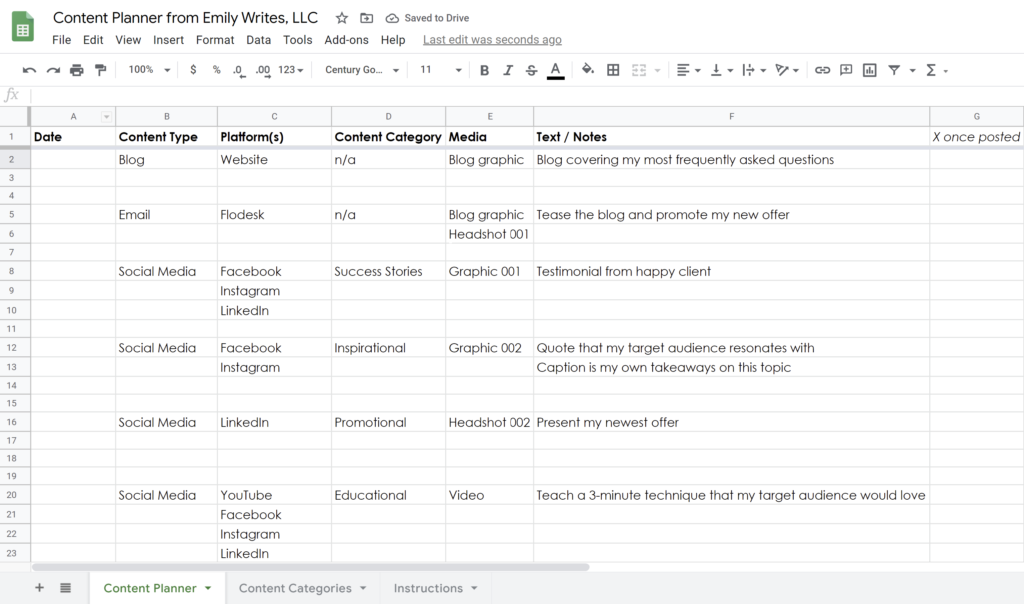
I recommend creating 1 week or 1 month of content at a time, and using a scheduling software like Agorapulse. This gives you time to react to new post ideas that pop up, while still providing leeway in case you have a busy week coming up and you want your social media to run itself.
Step 6: Recycle Past Content
Listen, you totally have permission to reuse past content on social media! Most businesses aren’t changing minute-to-minute, and not all of your followers actually see every single post.
Chances are, that great post you wrote about your client success story six months ago would still be relevant and interesting to your audience today. If you shared it as a graphic, why not make a video this time around?
Or think about the inspirational quote you shared last year around this same season. Do you really think anyone will notice if you share it again, maybe with a fresh caption (or maybe not)?
You can also recreate videos you did in the past, with a little new information if applicable… or just share the whole video again, with a new caption!
Educational blogs can be converted into social media carousels. Podcast episodes can be reimagined as social media infographics. Really, the possibilities are endless. That’s why I wrote a whole blog about the benefits and practicalities of content repurposing – read it next!
Never Run Out of Ideas Again!
Brainstorming social media content doesn’t have to be something you dread. The key is just building systems! At the end of the day, the best social media content comes from understanding your audience’s needs and sharing your authentic expertise. These brainstorming steps simply help you package that knowledge in new ways.
If you’re ready to start building a strategic content presence but need help putting your brilliant ideas into action, my team and I would love to help. We specialize in transforming your brand’s expertise into compelling marketing content. Just request services at this link to get started!